Saturday, 17 March 2018

Music Video Rough Cut/Feedback

Here is my rough cut of the music video:

Feedback on the rough cut:
After showing the music video to a small group I gave them a link to a survey on SurveyMonkey in order to get feedback on my music video: Create your own user feedback survey
From the survey answers I found the following:

Pros:

  • Good Story
  • Unique Effects
  • Nice Varied Shots
  • Most think the video fitted into the "folk" genre
Cons:
  • Needs lip synching
  • The scenes with the stock footage needs to be actually shot
  • Tighter editing
  • More editing 'to the beat'
From these answers I now know that I need to film some more scenes, specifically the lip syncing and the stock footage, and I need to spend more time editing.

Thursday, 15 March 2018

Editing the Music Video - Day 3


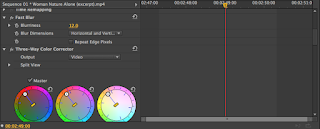
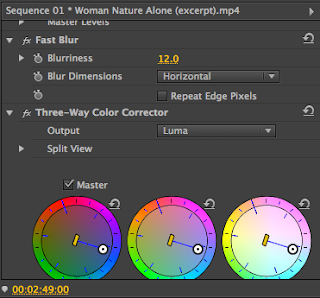
In this editing session I uploaded all the new footage that I filmed. Firstly since the scenes with the girl is meant to be a dream/flashback sequence I used various effects to give this idea. I added fast blur, which I increased by 12%, I then slowed the footage down by 50% to make it more dream-like and finally I used three-way colour corrector to have to footage have a more orange filter over it, creating a more warm mood.

I also added the lip synching clips into my video. In order to get the lip synching as accurate as possible I had to layer the clips of me lip synching from the point the song starts. I then did some colour corrector to the clips. Since I now had more clips I could now get rid of or shorten clips that dragged on, allowing my video to be tighter.

Tuesday, 13 March 2018

Filming the Music Video - Day 4

In the final filming session I filmed the lip synching. I managed to get all the necessary props and thought about mise-en-scene before film, taking down posters. I had to memorise the lyrics and downloaded to song onto my phone to allow more accurate lip synching. I would have liked to film this session outside however the weather was too inconsistent to allow this.

Friday, 9 March 2018

Filming the Music Video - Day 3

After getting feedback on my music video I started to film more shots that was recommended by others. I filmed the shots of the girl dream/ flashback sequence that I originally used stock footage for. I had all the costume and props ready and knew where to film. There was also not an extreme amount to film so I was able to get the necessary footage and about an additional 5 minutes of useable footage as a back up.

Saturday, 24 February 2018

Filming the Music Video - Day 2


After my editing session I was now able to have more organisation in my filming of the music video as I knew exactly what I needed to film and where I needed to be. I managed to stay on schedule and knew which locations I needed to go in order to film, this saved a lot of time which allowed for additional shots.
Since I stayed on schedule I then had time to film in another location in order to film another scene. This location was not the most ideal as some of the mise-en-scene was not entirely fitting for the scene, this was however the most accessible area and the location was appropriate enough for the music video.


Editing the Music Video - Day 1

In my first editing session I uploaded my footage to Premiere Pro. I deleted the footage that was unnecessary and organised the rest. During editing I got to see what footage came out well and what might need re-filming. I also got to see how much time was filled with the footage I already had which gave me a good idea on how much more filming I needed to do.

This was a successful first filming session as it allowed me to get a good idea of what I have already filmed and what I need to film. Next time I edit I aim to have more focus on the more complex editing such as effects, transitions and a precise edit to the beat of the song.

Friday, 16 February 2018

Editing the Music Video - Day 2

In my second editing session I was able to do more advanced editing as I now had enough required footage. I first added all the footage I needed for the video and deleted the unnecessary clips in order to have more organisation. I unlinked all the videos from their audios so that I could delete audio of the clips without deleting the clips. I then took the footage I had on the timeline and looked more carefully at it in order to edit it to the beat of the song. 

After the editing of the clips I used the three-way colour corrector and applied it to my clips. This effect allowed me to change the saturation and colour of my clips in order to change the mood of the clips. I then found that some of the clips of mine were darker than I had hoped and so I applied the brightness and contrast to some clips which thankfully worked in improving the quality of the clips.